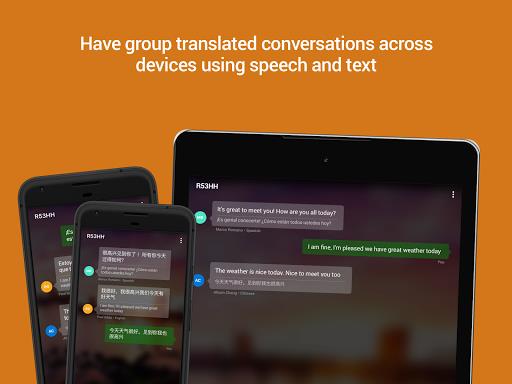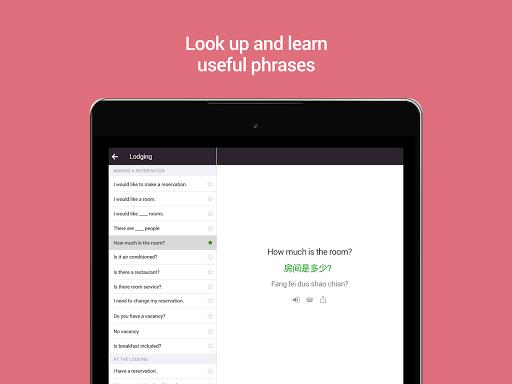

With Microsoft Translator, language barriers are a thing of the past! This app offers translation services in over 60 languages, including text, voice, camera photos, and screenshots. Perfect for travelers, you can even download languages for offline use. Need to have a conversation with someone who speaks a different language? No problem! The split-screen mode allows for bilingual conversations, and you can even connect multiple devices for group chats. With features like phrasebooks, pronunciation guides, and alternate translations, you'll be speaking foreign languages like a pro in no time. Say goodbye to language barriers with Microsoft Translator!
Features of Microsoft Translator:
> Translate text into over 60 languages for online and offline use.
> Translate text within photos and screenshots with camera translation.
> Translate speech with voice translation, and use split-screen mode for bilingual conversations.
TIPS Microsoft Translator
> Have in-person conversations with up to 100 people across multiple languages.
> Access phrasebooks for verified translations and pronunciation guides to learn important phrases in foreign languages.
> Share your translations with other apps, save frequent translations, and sync translations between devices.
CONCLUSION
In conclusion, Microsoft Translator is a powerful and versatile app that provides easy and convenient translation services for a wide range of languages. With features such as offline translation, camera translation, and multi-person conversation translation, this app is essential for anyone who needs quick and accurate translations on the go. Download now to break language barriers and communicate effectively wherever you are.
Additional APP Information
Version
4.0.543x 2b44aba7
Size
74.00M
Language
English
Rating
4.5
Package Name
com.microsoft.translator
Developer
Microsoft Corporation